



Release Notes
New Product Features: Enhancing Efficiency Across the Board
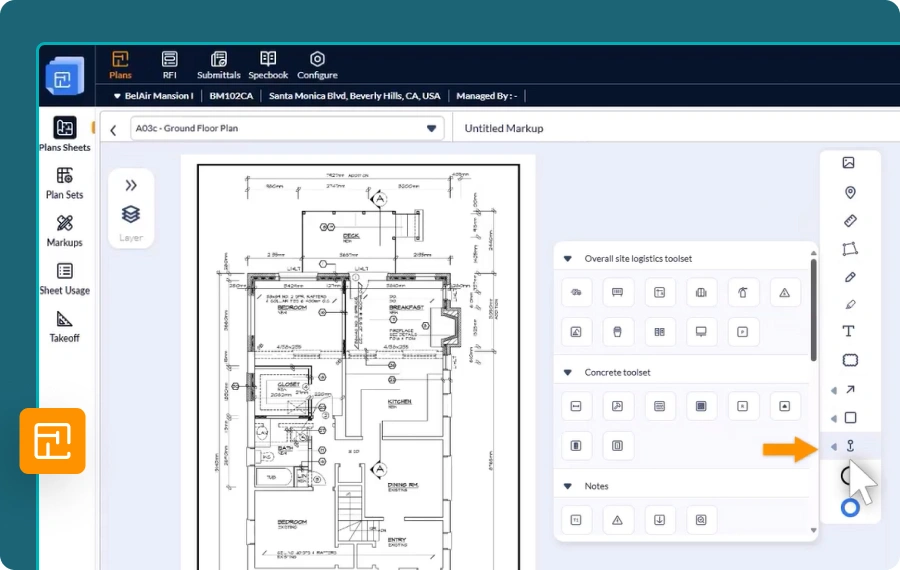

1. Plans – Location Identifiers and Custom Pins
Easily mark precise locations on plan sheets using graphical pins to visually represent tasks, installations, or site-specific features.
- Choose from Categorized Icons - Access a built-in library of icons to represent equipment, fixtures, job types, installations, purpose-specific locations, and more.
- Pinpoint with Purpose - Use pins as markups to highlight exact locations for installations, work, defects, inspections, site coordination & safety.
- Enhance Project Documentation - Ideal for adding clarity to RFIs, Submittals, Punchlists, T&M tickets, and other project workflows.


2. Scheduler Update – Manage Task Dependencies in Gantt View
Easily establish task relationships directly within the Gantt chart using streamlined visual interactions for better planning and control.
- Click to Connect Task Edges - Easily define dependencies by selecting the relevant edges of task bars—streamlined and precise, without the hassle of drag-and-drop.
- Set Dependency Type and Lag - Choose from Finish-to-Start, Start-to-Start, Start-to-Finish, or Finish-to-Finish, and optionally enter lag days.
- Auto-Adjust Successor Timelines - Successor task dates are automatically updated based on the defined relationship and lag input.
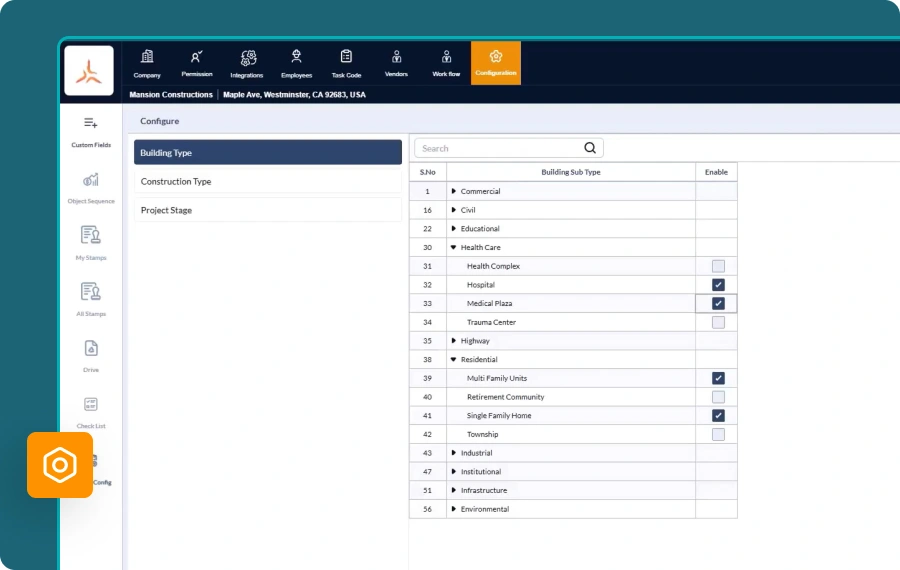
3. Company-Wide Project Attributes Configuration
Standardize project parameters across your organization by defining structured attribute lists aligned with your company’s policies and project types.
- Key Project Attributes Master Lists - Create centralized lists with predefined options for building types, job categories, and project stages.
- Ensure Consistency During Project Creation - Limit attribute selection to approved values to reduce errors and maintain organizational standards.
- Simplify Project Setup - Accelerate project initiation with a guided and uniform attribute selection process.
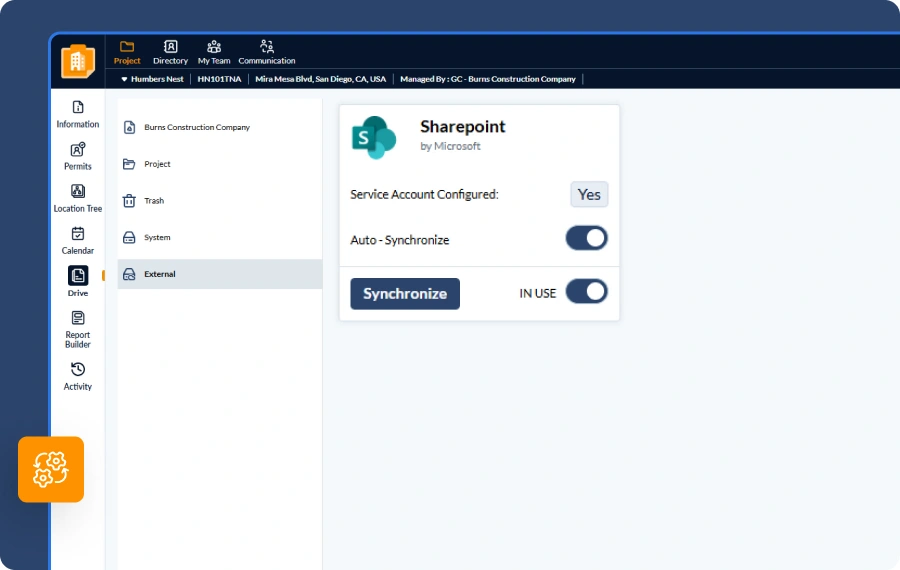
4. Project Drive Integration - Sharepoint
Seamlessly connect your Linarc project file repositories with Microsoft SharePoint to enable secure backup, access, and collaboration—anytime, anywhere. This integration ensures your project files stay organized, accessible, and in sync across platforms.
- Easy Account Integration - Link your SharePoint account to your company’s Linarc account in just a few simple steps.
- Smart Repository Sync - Configure each project to sync its files and folders to a corresponding structure on SharePoint, including company, project, and system drives.
- Comprehensive File Transfer - Push all files—both manually uploaded and system-generated (like RFIs, Submittals, and T&M tickets)—to your SharePoint site.
- Real-Time Updates and Collaboration - Enable auto-sync to reflect changes such as file additions, renames, or deletions in near real-time, and easily collaborate with internal teams or external partners via SharePoint.
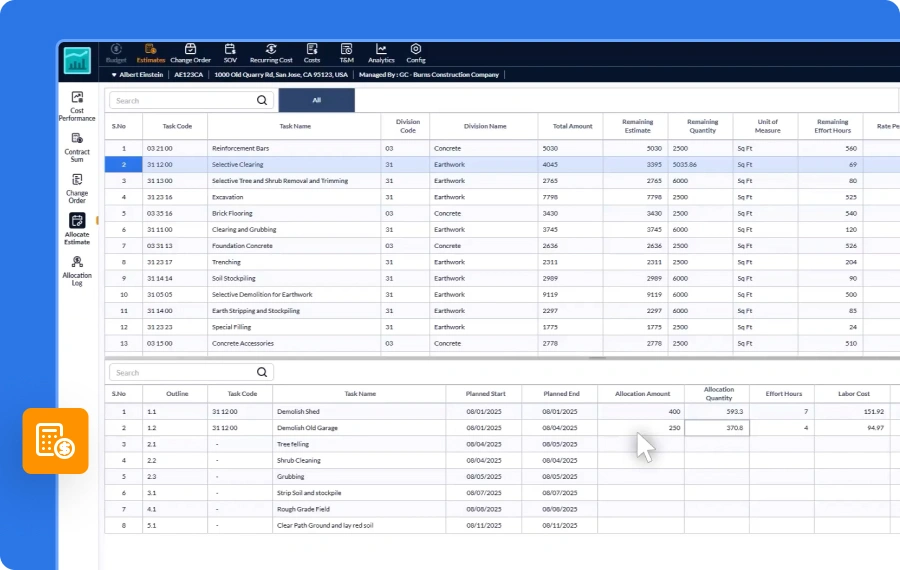
5. Smarter Control with Project Estimates
The enhanced Estimates module enables contractors to define and manage project estimates with greater precision, structure, and accountability.
- Lock Finalized Estimates - Protect the finalized project estimate by locking it to prevent unintended edits or changes.
- Enforce Change Control - Ensure any modifications go through a formal change order process, maintaining transparency and traceability.
- Enable Accurate Cost Tracking - Distribute funds from locked estimate items across scheduled tasks, allowing for precise tracking and automated SOV generation.
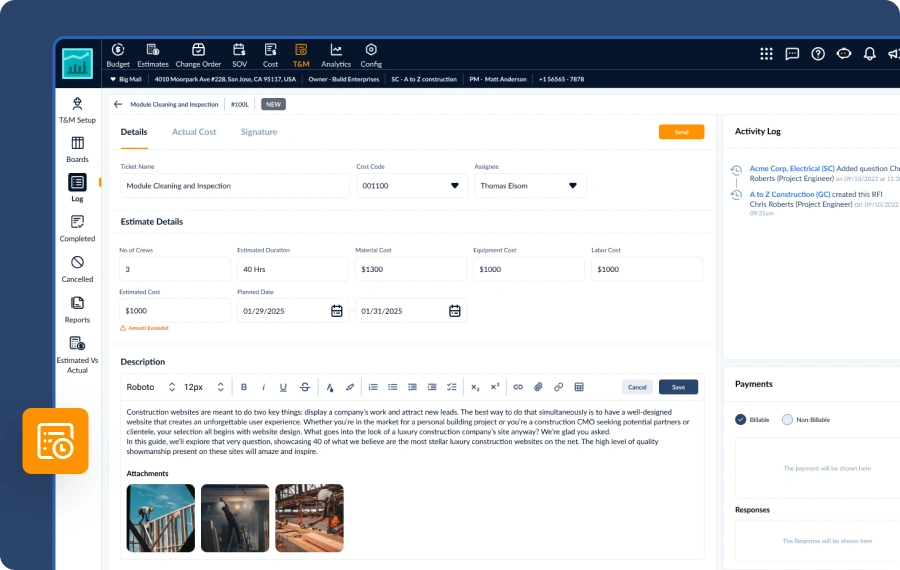
6. Enhanced Flexibility in Time & Material Ticket Creation
The Time and Material (T&M) module now supports ticket creation directly from the office, enabling better coordination for special case scenarios.
- Office-Initiated Ticketing - Managers and authorized staff can now generate T&M tickets from the web console for pre-approved extras or client directives.
- Improved Workflow Alignment - Streamline communication between office and field teams, ensuring clarity and accountability for unplanned or out-of-scope work.
- Seamless Field Coordination - Created tickets can be forwarded to field teams for execution and tracking, just like mobile-initiated tickets.
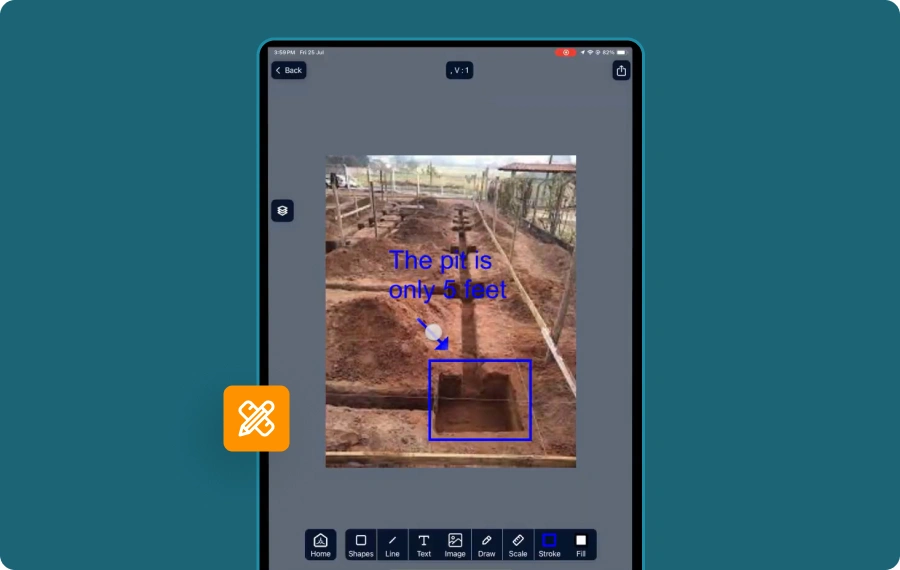
7. Visual Clarity with Photo Markups
Easily annotate project photos—whether captured in real time or uploaded from saved images—to clearly highlight and communicate areas needing attention.
- Annotate with Precision - Use a variety of markup tools to highlight specific locations on photos and field images as needed.
- Integrated Across Workflows - Add context to task updates, RFIs, punchlists, and other project communications with annotated visuals.
- Markup from Anywhere - Available on both the web console and mobile app, enabling seamless collaboration between field and office teams.
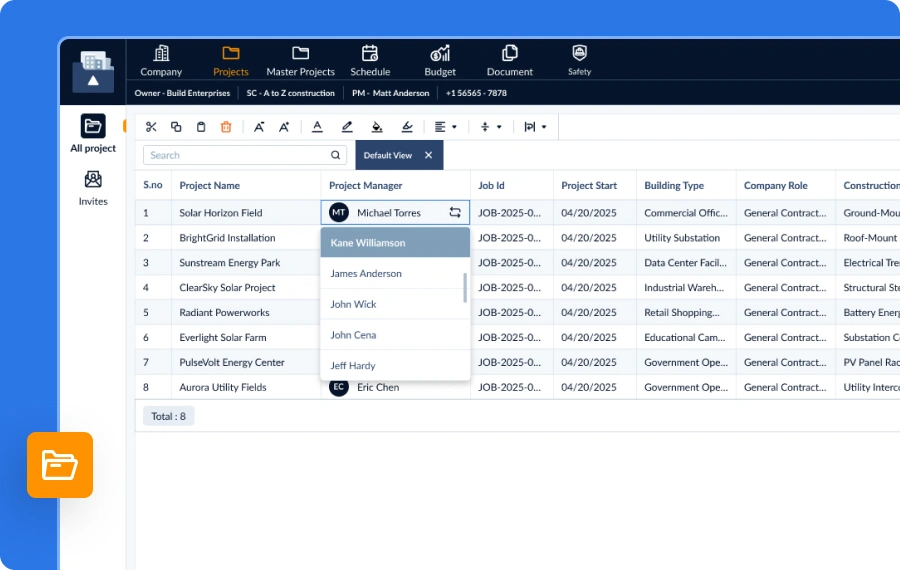
8. Reassign Project Leadership with Ease
Maintain project momentum with the ability to reassign principal project managers as needed—ensuring smooth transitions and uninterrupted oversight.
- Flexible Leadership Management - Easily update the designated principal project manager to adapt to changing team dynamics or organizational needs.
- Seamless Transitions - Ideal for covering planned absences, role changes, or departures—without impacting project continuity.
- Controlled Access - Only authorized managers can make leadership changes, maintaining clear accountability and governance.
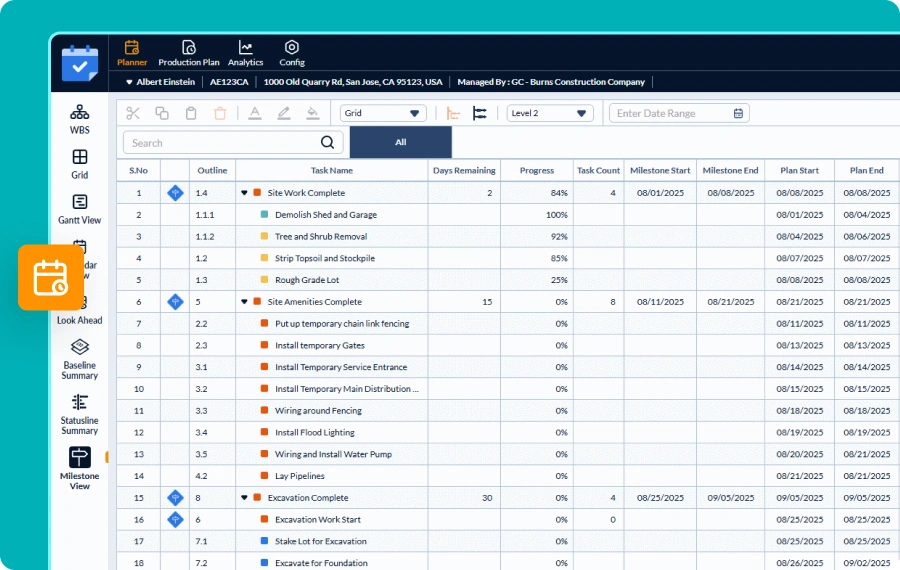
9. Scheduler – Milestone View
The new Milestone View organizes tasks by the milestones they contribute to, providing a structured and insightful way to track project progress.
- Milestone-Based Task Grouping - View all tasks required to achieve each milestone, along with detailed scheduling data such as planned timelines, current progress, and more. Gain clearer visibility into project progress, identify potential delays early, and prioritize critical activities with confidence.
- Comprehensive Progress Insights - Get a statistical summary for each milestone, including task count, earliest start, latest end date, and days remaining to reach the milestone.
- Highlight Unlinked Tasks - Tasks not linked to any milestone are grouped under the Not on Milestone category, along with a count for easy tracking and follow-up.
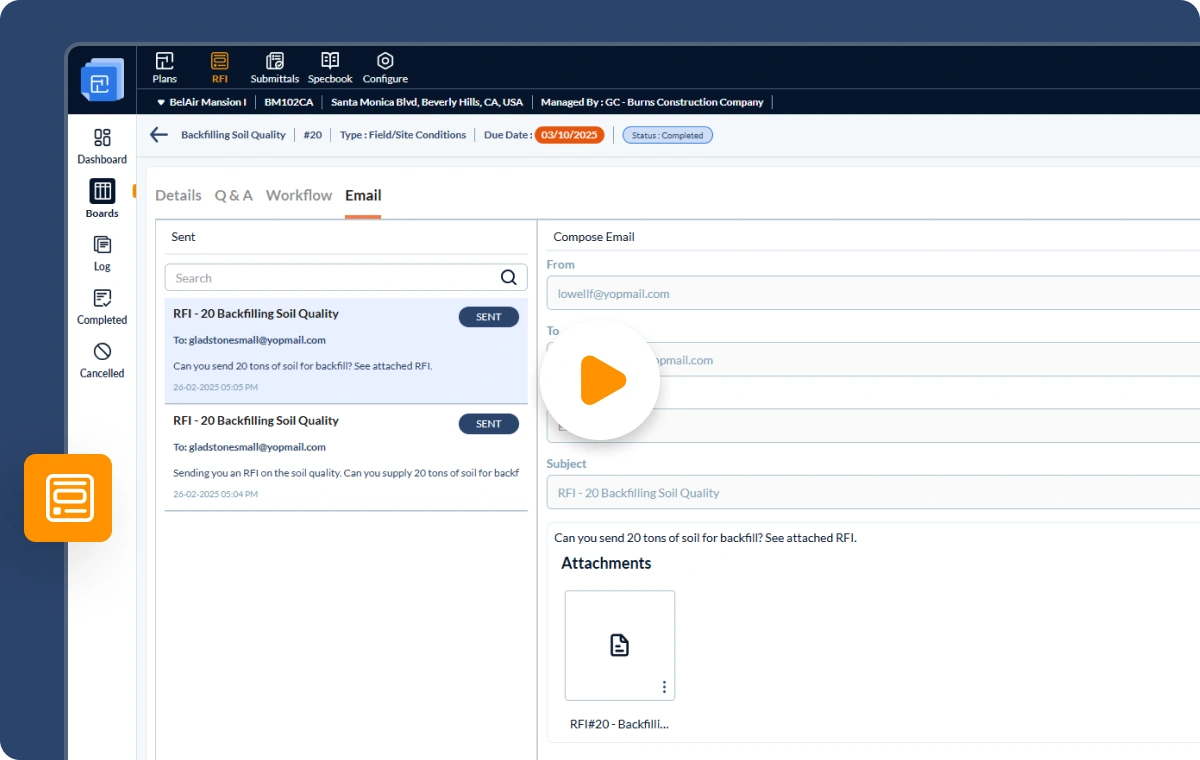
10. Built-in Email Module
Collaborate Seamlessly With External Parties Without Leaving Linarc
- Contextual Communication - Send and receive emails directly from RFIs, Submittals, and Change Orders to collect timely, relevant input from external parties.
- Integrated Workflow - All replies stay within the same module, letting you incorporate feedback and keep internal processes moving without disruption.
- Centralized Control - Use the email module for any project communication, in any context—no external apps needed. Everything stays organized, traceable, and nothing falls through the cracks.
.svg)
Our website uses cookies

