
Linarc vs. QuickBooks

QUICKBOOKS KEEPS THE BOOKS. IT CAN'T RUN THE JOB.

Most contractors don't need to leave QuickBooks. They need the schedule, the crew, and the job cost to live somewhere that talks to it. That's Linarc.
One shared schedule across every trade
Linked records icon
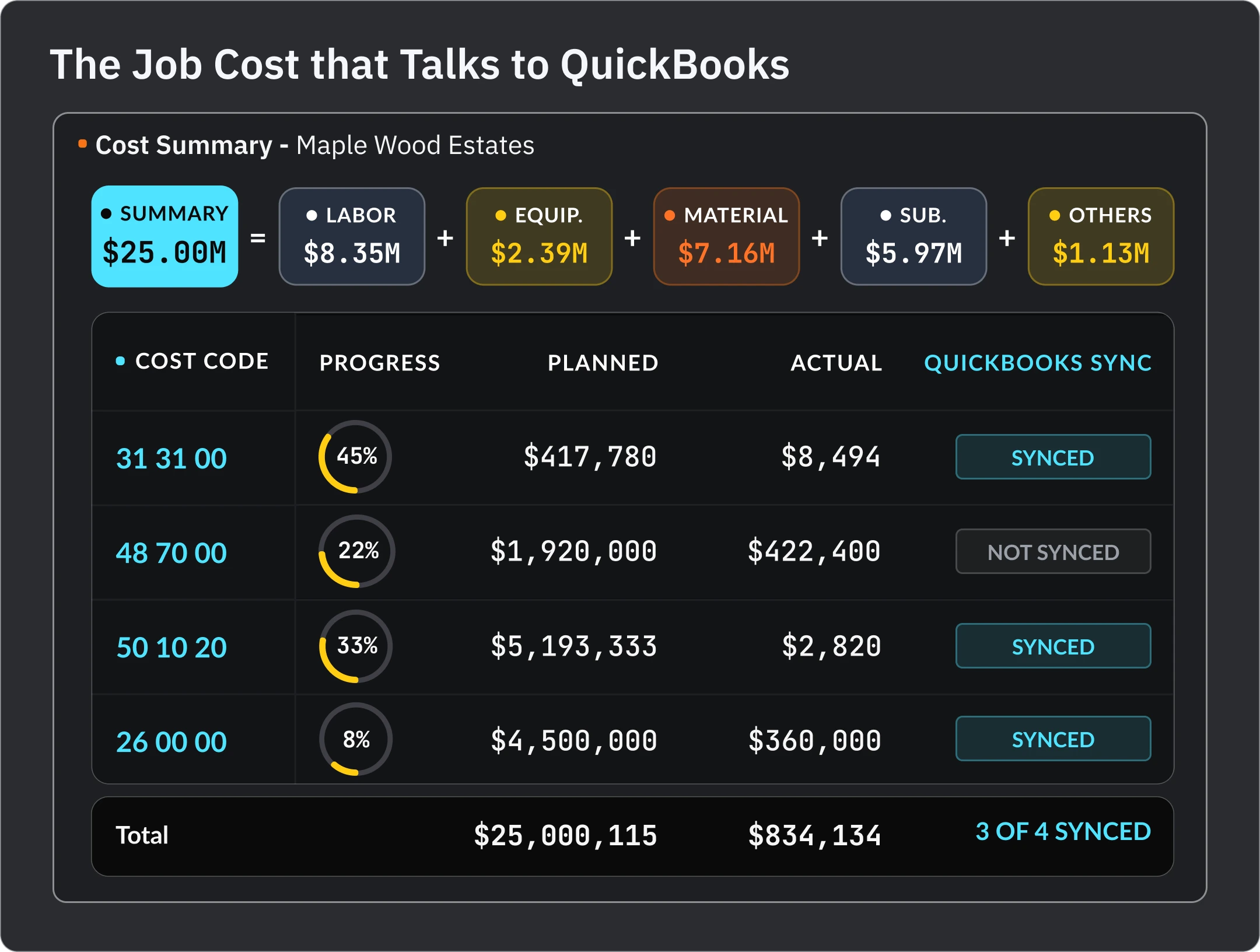
Job cost, live from the field
Shop hours gauge icon
Pay apps and SOV built in
Margin trend icon
Syncs to QuickBooks, doesn't replace it
[01]// The Frame

ACCOUNTING IS THE END OF THE JOB, NOT THE JOB

Three things QuickBooks was never built to do.

See the schedule

QuickBooks has no idea what is happening on the jobsite this week. Linarc's schedule and field logs are where the cost comes from.

Cost the job while it's running

In QuickBooks a cost exists once a bill is entered. In Linarc committed cost, crew hours, and change orders hit the job the day they happen.

Bill the way construction bills

Schedule of values, progress pay apps, retainage, change orders on the contract. Linarc does that and hands accounting the result.

[02]// Feature Comparison

WHERE THE GAP SHOWS UP

The workflows a contractor runs every week.

Workflow
QuickBooks
Linarc
General Ledger, Payroll, Tax
✔QuickBooks leads
✘Not offered, syncs to QuickBooks
Scheduling
✘Not offered
✔CPM, look-aheads, pull planning
Job Cost While the Job Runs
◐After the bill is entered
✔Committed cost, crew hours, live variance
Crew Time Cards
◐Via add-on
✔Native app, posts to cost codes
Change Orders
◐An invoice line
✔Update contract and schedule
SOV and Progress Pay Apps
◐Templates or add-ons
✔Built in
WIP
◐Built by your CPA from exports
✔Linarc can generate your WIP
RFIs, Submittals, Drawings
✘Not offered
✔Built in
Field and Daily Reports
✘Not offered
✔Mobile, offline
Fits with QuickBooks
–n/a
✔Yes, keep it
✔ Full ◐ Partial ✘ Not offered–Not applicable
[03]// Everyone Syncs to QuickBooks

EVERY PLATFORM SYNCS TO QUICKBOOKS. THAT'S THE FLOOR.

The question is what happens before the sync.

Every construction platform on the market connects to QuickBooks. Some charge extra for it. The difference is what the platform does with the job before the numbers reach accounting. If job cost only becomes real once a bill is entered, you are finding out about overruns from your bookkeeper. In Linarc the crew, the schedule, and the change orders cost the job as it runs, and QuickBooks gets the finished picture.

WEEK 1WEEK 4WEEK 8WEEK 12CLOSEOUT
Accounting first

Nothing costs the job until the paperwork reaches the books.

BILL ENTERED · cost becomes real
Linarc

The crew, the schedule and the change orders cost the job as it runs.

COST ACCRUES FROM DAY ONE
Both sync to QuickBooks

Every platform connects, and some charge extra for it. What changes is how much of the job you had already seen when it fires.

Everyone syncs. Not everyone knows the number first.
[04]// How the Quote Is Built

THE CHEAP PART IS THE BOOKS

What running a job on QuickBooks really costs.

QuickBooks
Linarc
THE BASE
The subscription is inexpensive.
Priced on the platform, users, and capabilities you need.
THE ADD-ONS
Job costing and time tracking are add-ons, each with a fee.
QuickBooks sync included, no monthly connector fee.
THE WORKAROUNDS
The schedule, RFIs, and daily reports live somewhere else, usually a spreadsheet.
Onboarding included. Live on your first project in 3 to 4 weeks.
WHEN YOU GROW
Your CPA rebuilds the WIP from exports every quarter.
Your revenue never sets the price.
[05]// At a Glance

ACCOUNTING SYSTEM, OR CONSTRUCTION PLATFORM

QuickBooks wins the books. Linarc wins the job. Use both.

QuickBooks
1/6 CONSTRUCTION WORKFLOWS SCHEDULING LIVE JOB COST CREW TIME CARDS SOV AND PAY APPS RFIs AND FIELD GL AND PAYROLL LEADS ON THE BOOKS

The right accounting system for most growing contractors. Not a scheduling, field, or job cost tool, and it was never meant to be.

Linarc
5/6 CONSTRUCTION WORKFLOWS SCHEDULING LIVE JOB COST CREW TIME CARDS SOV AND PAY APPS RFIs AND FIELD GL AND PAYROLL FIVE OF SIX, SYNCS THE SIXTH

Schedule, field, job cost, and billing on one record. Syncs to QuickBooks so accounting sees the finished picture without re-keying.

[06]// Who It's For

BUILT FOR THE CONTRACTOR WHO FINDS OUT ABOUT OVERRUNS FROM THE BOOKKEEPER

sharper look-ahead
Owner Who Runs it All
Know where the job stands today, not at month-end.
Learn more
sharper look-ahead
Office Manager / Bookkeeper
Pay apps and cost codes that arrive ready for QuickBooks.
Learn more
sharper look-ahead
Super / Foreman
Hours logged on a phone that actually cost the job.
Learn more
[07]// Make the Call

KEEP QUICKBOOKS. RUN THE JOB IN LINARC.

See job cost that updates from the field and a WIP you don't have to rebuild.