
Join Our Free Webinar: Find the Notice Window Before the Delay
Reserve My Seat
Icon Rounded Closed - BRIX Templates
Free WIP Schedule Template

THE ONE DOCUMENT YOUR BONDING CAPACITY RIDES ON

Your surety reads the WIP schedule before it decides what you can carry. Your bank reads it before it lends. Here is the template, free, with the math already in it.

Fill in five figures and a job name per job. The file calculates the rest.

WHAT A WIP REPORT IS AND HOW IT WORKS →
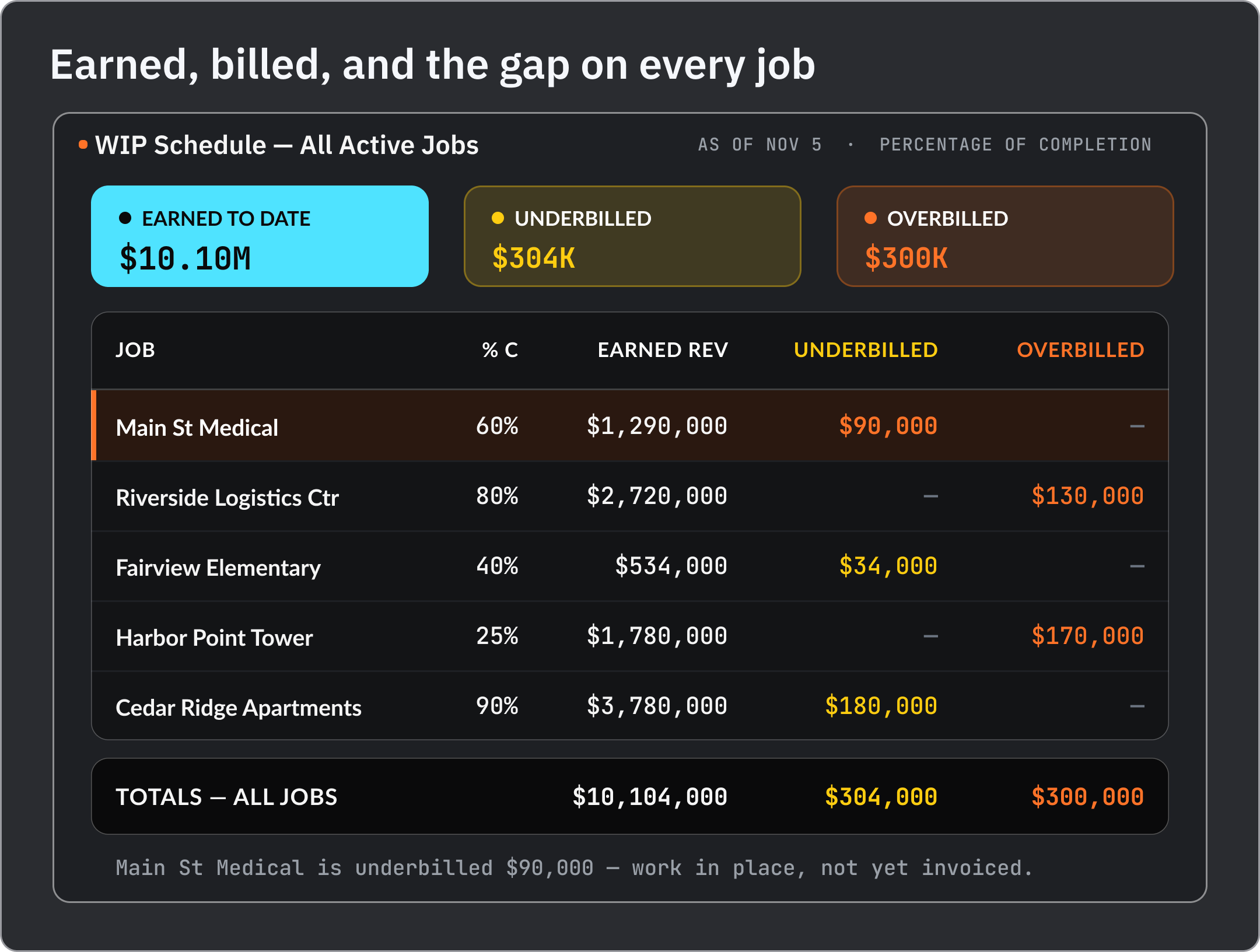
One shared schedule across every trade
[01]// THE TEMPLATE

WHAT IS ACTUALLY IN THE FILE

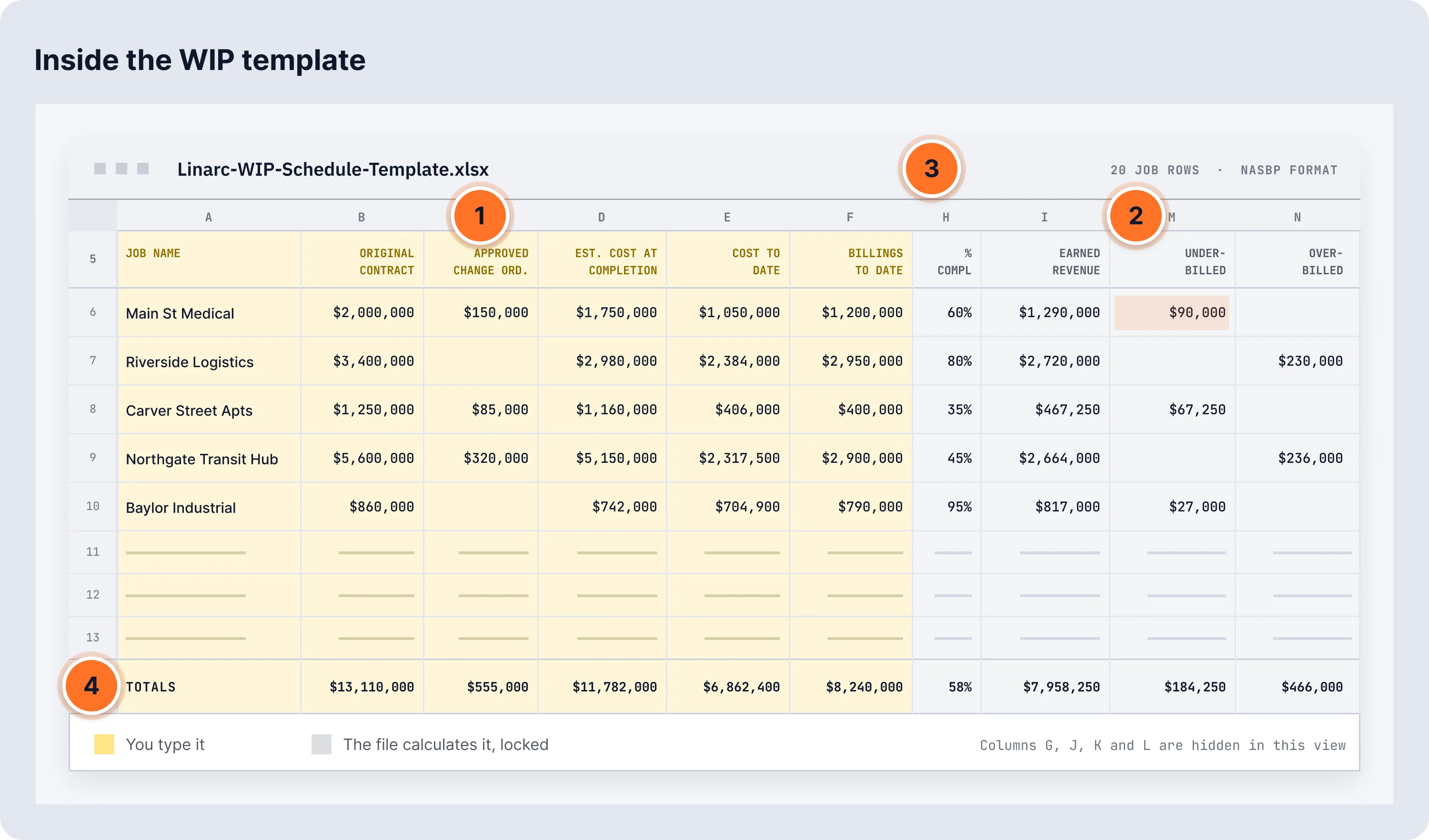
Six columns you fill in. Eight the file works out for you. Nothing hidden in a tab you have to go find.
WHAT YOU FILL IN
6 COLUMNS
Job name / number
However you already identify the job in your books.
Original contract amount
The signed contract, before any changes.
Approved change orders
Owner-funded and owner-approved only. Internal budget moves do not go here.
Estimated cost at completion
Your current best estimate of total cost, revised as the job changes.
Cost to date
Everything booked to the job so far.
Billings to date
What you have invoiced the owner, not what they have paid.
WHAT THE FILE CALCULATES
8 COLUMNS  ·  LOCKED
Revised contract
Original contract + approved change orders
Percent complete
Cost to date ÷ estimated cost at completion
Earned revenue
Percent complete × revised contract
Cost to complete
Estimated cost at completion − cost to date
Estimated gross profit
Revised contract − estimated cost at completion
Gross profit earned to date
Estimated gross profit × percent complete
Underbilled
Earned revenue − billings to date, shown only when positive
Overbilled
Billings to date − earned revenue, shown only when positive
01
Every input column notes where the number comes from in QuickBooks.
02
Calculated columns are locked, so a stray click cannot break a formula.
03
Standard NASBP format, the one your surety and bond agent already use.
04
A totals row across all jobs, the line the surety reads first.

A job lands in underbilled or overbilled, never both.

[02]// READING IT

BILLED AHEAD, OR BEHIND THE WORK

The file splits your billing position into two columns, and every job lands in one of them. Here is what each side means for your cash, and what gets read into it.

The file keeps them apart because your balance sheet does. One is an asset. The other is a liability. They do not net out into a single figure.

UNDERBILLED
Costs and Est. Earnings in Excess of Billings
You have earned more than you have billed.
POPULATED WHEN
Your earned revenue runs ahead of your billings to date.
CASH
You paid for that work and have not been reimbursed. You are lending the owner money at zero percent.
BALANCE SHEET
It sits as an asset, and it is an asset you cannot spend.
THE SURETY READ
Underbilling raises the question of which cause it is: billing that has fallen behind, change order work performed before approval, or a cost overrun the estimate has not absorbed yet. The first is administrative. The other two go to whether the estimate can be trusted.
OVERBILLED
Billings in Excess of Costs and Est. Earnings
You have billed more than you have earned.
POPULATED WHEN
Your billings to date run ahead of your earned revenue.
CASH
You are holding money for work you have not performed yet. It spends like profit and it is not profit. The job still owes that work.
BALANCE SHEET
It sits as a liability, because what you are holding is an obligation.
THE SURETY READ
Front-loaded billing early in a job is normal and expected. Heavy, sustained overbilling across several jobs reads differently: it looks like one owner’s money funding another owner’s job, and it means the cash on your balance sheet is already committed.
Neither column is disqualifying on its own. What gets read is the direction across periods, which is why a WIP you build once does not tell you much.
[03]// THE HONEST PART

THIS FILE WILL STOP WORKING. HERE IS WHEN

The template is real work for a handful of jobs. Past that, it fails in the same four ways every time, and it is worth knowing them before you are relying on it.

01
The inputs are hand-carried.
Cost to date and billings live in another system and get retyped into this one. Every retype is a chance to be wrong, and the error usually surfaces at year end, in front of your CPA.
02
The estimate goes stale first.
Estimated cost at completion is the denominator under percent complete. Leave it at the original budget while the job changes and percent complete is wrong, which makes earned revenue wrong, which makes your billing position wrong.
03
It is a month-end artifact.
You build it after the period closes. That means you find out a job slipped after the money is already spent, which is the one thing a WIP is supposed to prevent.
04
Version confusion at volume.
Emailed, copied, renamed. Somewhere around eight or ten concurrent jobs the question stops being “what does the WIP say” and becomes “which WIP.”
A spreadsheet can do the math correctly every time. What it cannot do is keep the inputs current, and the inputs are where WIP reports actually go wrong.
WHAT A WIP REPORT IS & HOW IT WORKS  →
[04]// GET THE FILE

GET THE TEMPLATE. THEN GET IT CURRENT

The file is yours to keep. When the retyping stops being worth the hour it costs you, the same numbers can come from the work itself.

Download the template and run your own jobs through it. When you want the cost to date and the billings behind it to update without anyone rebuilding the schedule, that is what Linarc does. Linarc generates this same report inside the platform, downloadable and emailable to your bond agent.

Is the template free?

Yes. It is gated behind a short form, not a payment. Download it, keep it, use it on as many jobs as you want.

What format is it in?

A spreadsheet with the calculated columns locked. Input columns are yellow, calculated columns are grey.

Do I need Linarc to use it?

No. The file stands on its own and works from figures you can pull out of QuickBooks Online and Sage Intacct today.

How many jobs can it handle?

The file ships with room for twenty jobs and a totals row across all of them. If you are running more jobs than fit in one clean spreadsheet, that is the file telling you something, and it is covered in the honest section above.

Where do I get cost to date and billings to date?

From your accounting system. Each input column in the file notes the source so you are not guessing at the mapping.