Join Our Free Webinar: Find the Notice Window Before the Delay
Reserve My Seat
Icon Rounded Closed - BRIX Templates
WORK IN PROGRESS REPORTING

KNOW WHERE EVERY JOB ACTUALLY STANDS

A work-in-progress report turns raw job costs into a picture of earned revenue, billing position, and profit you can defend. Here is how it works, and how to keep it current.

One shared schedule across every trade
[01]// WHAT IT IS

A WIP REPORT, IN PLAIN TERMS

Not an accounting formality. A read on whether each job is ahead or behind, and by how much.

01
A work-in-progress report answers one question across all your active jobs: given what each job has cost so far and what it is contracted for, how much revenue have you actually earned, and are you billed ahead of that work or behind it?
02
Get it right and you can see a job slipping while there is still time to act. Get it late, and you are reading history.
03
Your CPA needs it, your surety needs it, and you need it long before either of them asks.
[02]// THE MATH

THE NUMBERS THAT TELL THE TRUTH

The percentage-of-completion math underneath every WIP report.

01
Revised contract
Original contract + approved COs
02
Percent complete
Cost to date ÷ Est. cost at completion
03
Earned revenue
% complete × Revised contract
04
Cost to complete
Est. cost at completion − Cost to date
05
Estimated gross profit
Revised contract − Est. cost at completion
06
Gross profit earned to date
Est. gross profit × % complete
WHERE THE JOB STANDS
Overbilled
Billings to date − Earned revenue
You have billed ahead of the work in place.
Underbilled
Earned revenue − Billings to date
You have work in place you have not billed yet.
A job lands in one, never both.
[03]// GET THIS RIGHT

NOT EVERY CHANGE IS A CHANGE TO THE CONTRACT

The single most common reason a WIP disagrees with the books is mixing two things that do not belong together.

OWNER-FUNDED CHANGE ORDERS
Added scope the owner is paying for.
These change your revised contract value.
They belong in approved change orders.
INTERNAL BUDGET ADJUSTMENTS
Moving money between your own cost codes.
These change your estimated cost at completion, not your contract.
They carry no contract reference.
Linarc keeps the two separated so the split is enforced, not left to memory.
[04]// THE REAL PROBLEM

THE NUMBER ARRIVES A MONTH LATE

Most contractors can produce a WIP. The trouble is when they get it, and whether they trust it.

Spreadsheets aging icon
STALE BY MONTH END
Field hours, commitments, and change orders reconcile after the period closes, so the WIP is old the day it is finished.
RFIs buried in email icon
REBUILT EVERY PERIOD
When nothing updates on its own, someone recreates the whole schedule from scratch each month.
Costs learned late icon
VERSION CONFUSION
The file gets emailed, copied, and renamed until nobody is sure which one is current.
Costs learned late icon
TOO LATE TO ACT
By the time a cost code shows it went over, the money is already spent.
A WIP report is only as good as the data underneath it, and how current that data is.
[05]// THE LINARC DIFFERENCE

THE DATA A WIP IS BUILT FROM, KEPT CURRENT

Linarc is where the schedule, the field, and the cost meet, so the numbers your WIP turns on stay live instead of reconciled monthly.
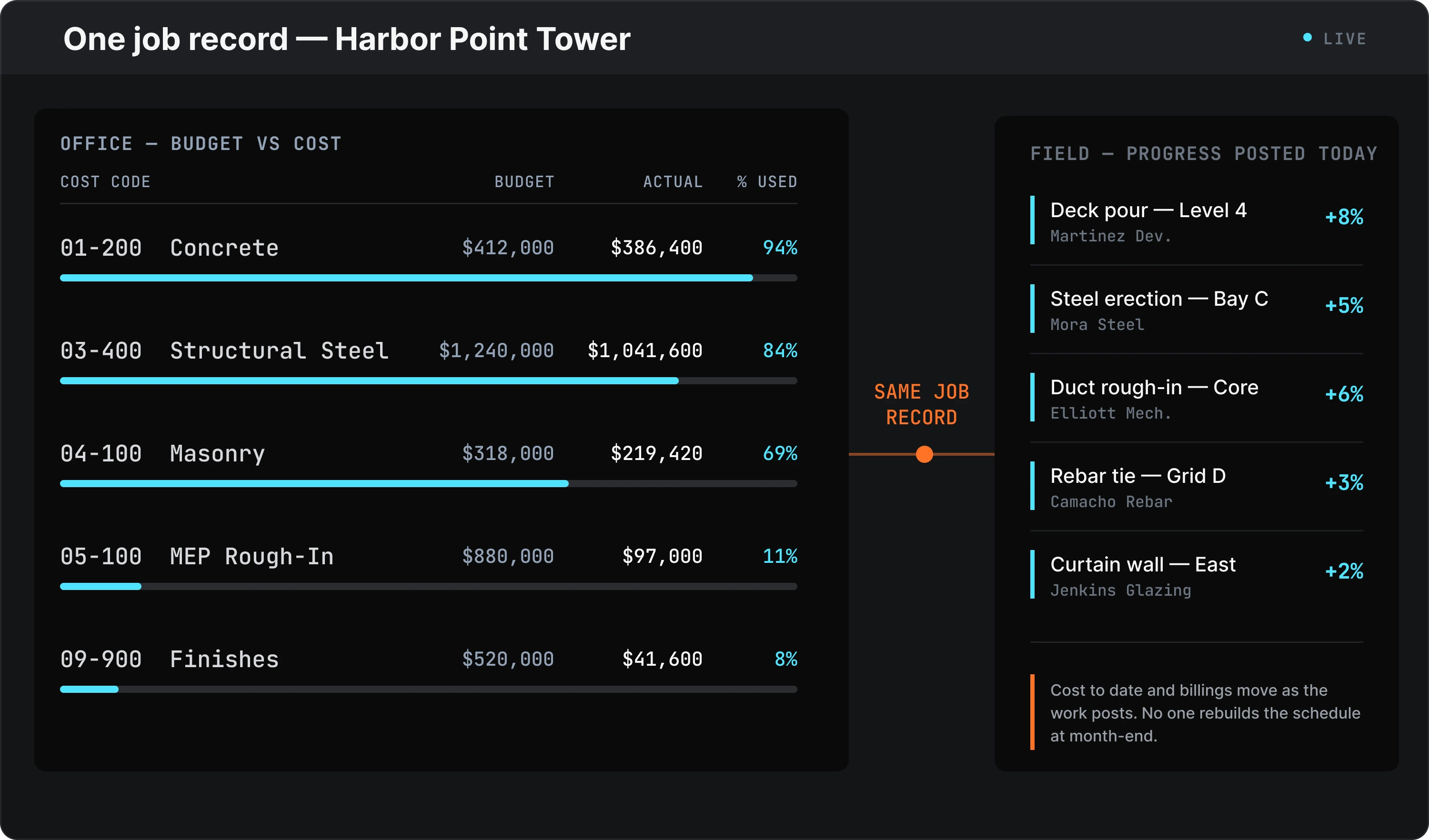
CONNECTED ON ONE JOB RECORD
Budget, cost codes, pay apps, and billing progress live against the same job, so earned revenue and billing position are built from connected data instead of reconciled from separate systems.
CURRENT, NOT MONTHLY
Costs, change orders, and billings update the numbers as they post, not at month-end.
THE OVER/UNDER SIGNAL
See where a job is billed ahead of or behind the work, while there is still time to act.
CHANGE HANDLED CORRECTLY
Owner-funded change orders update the contract; internal adjustments move cost only, kept separate automatically.
Linarc generates this same report inside the platform, under Finance, downloadable as PDF or Excel to hand to your bond agent.
[06]// A PLACE TO START

A FREE WIP TEMPLATE TO USE TODAY

Want to run the math now? Download a free WIP schedule template built for growing commercial contractors.

01

Calculates the eight numbers from the five figures you type in, with the calculated columns locked so a stray click cannot break a formula.

02

Every column notes where the number comes from in QuickBooks, so you are not guessing at the mapping.

03

Yours to keep, and a clear picture of where a spreadsheet stops working once you are running several jobs at once.
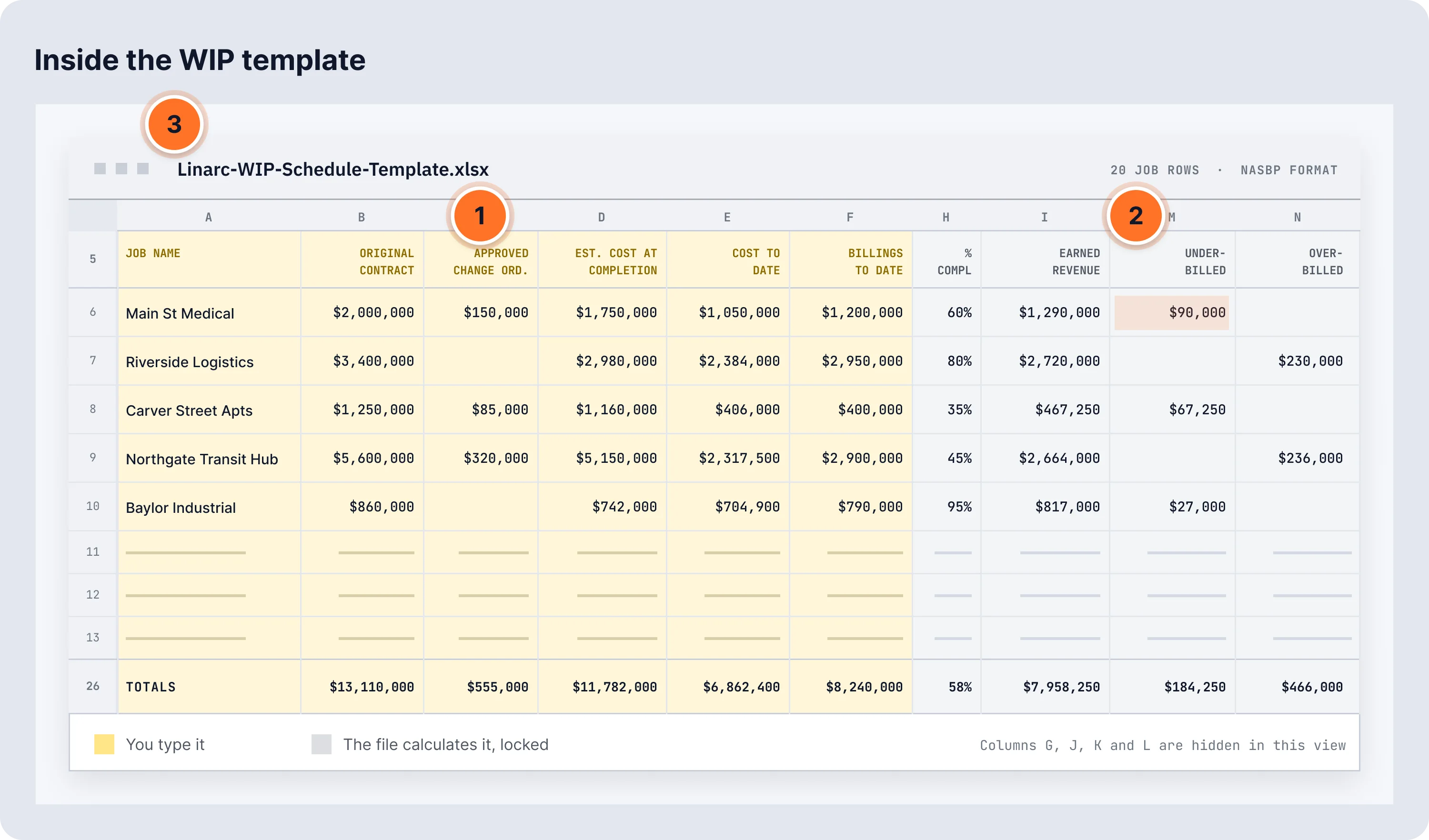
01
Column-letter row
02
Calculated columns
03
File name
[07]// Who Linarc IS For

For the People Who Answer for the Number

From the controller building the schedule to the owner who has to defend it.

sharper look-ahead
Owner / Principal
A defensible WIP for the bank, the bonding company, and the year-end conversation, without the monthly scramble.
Learn more
sharper look-ahead
Controller / CFO
Earned revenue, over/under billing, and cost-to-complete current across every job, not reconstructed each period.
Learn more
sharper look-ahead
PM / Project Executive
The cost picture on the job while there is still time to act on a slipping code.
Learn more
[08]// MAKE THE CALL

See Your WIP the Day You need it

One connected platform, from the field to the books, so earned revenue and over/under billing stay current across every job.

Request a demo, or start with the free WIP template.

Does Linarc replace my accounting system?

No. Linarc is where the project data lives: the schedule, progress, cost, billings, documentation. It syncs with QuickBooks Online and Sage Intacct so your accounting system works from the same numbers instead of a separate set.

Where does percent complete come from?

In Linarc, percent complete comes from the progress recorded on the job, against the schedule of values or the schedule. That progress drives earned revenue and the over- and underbilling column in the WIP report.

Cost is tracked against your budget and cost codes on the job, and approved billings flow through automatically, so the figures behind the math live with the project instead of scattered across files.

How does Linarc show over- and underbilling?

The WIP report sits under Finance at the company level, so every active job is in one view instead of pulled job by job. It is built from the contract, cost, and billing figures already tracked on each job, which is where the earned revenue and billing position come from. Download it as PDF or Excel when your surety asks for it.

Can I show a lender or surety where a job stood at quarter close?

Yes. Open the WIP report under Finance at quarter close, download it as PDF or Excel, and you have the position on file to send to your bond agent, lender, or CPA.

Do my subcontractors have to use it?

Subcontractor progress reporting is part of how the data stays current; subcontractors report progress and share it with the general contractor for review and approval. Field adoption is the point: if field leaders do not use the system, the office never gets clean data.

How does Linarc use AI on my project?

Lia reads the plan set, spec book, and prime contract and drafts the submittal log, revision comparison, and contract terms, each line traced to its source. The contractor approves every one before it enters the record.